What Is an Explainer Video? Meaning + Examples

Co-founder of Yum Yum Videos | Explainer Video & Video Marketing Expert
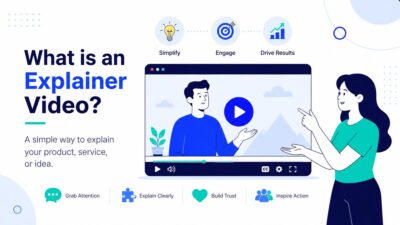
An explainer video is a short video that explains a product, service, process, or idea by combining a focused script with visuals that make the subject easier to follow. In business, most explainer videos run for about 60 to 90 seconds, although the right length depends on how much the audience needs to understand.
Explainer video meaning: the word “explainer” describes the video’s job, not its visual style. An explainer can use 2D animation, motion graphics, live action, a screencast, 3D, or a mix of techniques. What makes it an explainer is that the viewer should understand something more clearly after watching it.
At Yum Yum Videos, we have been producing explainer videos since 2012. Across more than 1,000 video projects, one pattern has stayed consistent: the hardest part is usually deciding what the video should explain and what should be left out. A 90-second piece cannot carry an entire sales deck.
Table of Contents
Explainer Video Meaning and Definition
The simplest explainer video definition is this: an explainer takes a subject that needs context and turns it into a short visual explanation.
That subject might be a SaaS platform, a healthcare product, a financial service, a new business model, an internal process, or a product feature. The format works especially well when a visitor cannot understand the value of the offer from a product image or one sentence alone.
An explainer video typically answers five questions:
- What is this?
- Who is it for?
- What problem does it address?
- How does it work or create value?
- What should the viewer do next?
The balance changes from project to project. A startup introducing a new category may spend more time on the problem. An established software company may move straight into the product. A healthcare company may need extra context before it can explain the solution accurately.
This is also why an explainer video is not defined by animation. Animation is common because it can show processes, systems, data, and ideas that are difficult to film, but the communication goal comes first.
What Does “Explainer” Mean?
In marketing and video production, an explainer is content created to explain something unfamiliar or difficult to understand.
That is the simplest explainer meaning.
The term usually refers to short videos, but the same logic can apply to an article, graphic, or presentation. In video, the format became popular because narration and visuals can work at the same time: the voice explains one part of the idea while the image shows another.
An explainer should leave the audience with a usable understanding of the subject. If the viewer finishes the video remembering the animation but still cannot explain what the company does, the video missed its main job.
Explainer Video, Explanation Video, or Explanatory Video?
People use explanation video, explanatory video, and explainer video to describe similar content. In business and marketing, “explainer video” is the most common term.
There is a small difference in how the words are usually used:
| Term | Typical meaning |
|---|---|
| Explainer video | A short business or educational video that explains a product, service, process, or idea. |
| Explanation video | A broader phrase for any video whose purpose is to explain something. |
| Explanatory video | Usually means the same thing as an explanation video, although it sounds more formal. |
| Product demo | Shows how a product or interface works, often with more detail than an explainer. |
| Tutorial | Teaches the viewer how to complete a task step by step. |
| Commercial | Focuses primarily on attention, persuasion, or brand awareness rather than explanation. |
So, if someone searches for explanatory video meaning or explainer video meaning, they are usually looking for the same core idea: a video designed to make a subject easier to understand.
How Does an Explainer Video Work?
An explainer video works by controlling the order in which the audience receives information.
That sounds simple, but it matters. A product page lets visitors jump between headlines, screenshots, features, menus, and pricing. A video chooses the sequence for them.
In our explainer video production process, the script does most of that work before animation begins. We decide what the viewer needs to know first, which details can wait, and where the visuals can explain something faster than the narration.
For example, a SaaS script does not need to describe every button on an interface. It may be enough to show the workflow while the voiceover explains the outcome. In healthcare, the visual sequence may need more time because the audience has to understand the context before the product makes sense.
This is why the script, storyboard, animation, and sound should not behave like separate layers. Each one has a different job.
What Makes an Explainer Video Easy to Understand?
The clearest explainers usually share a few practical characteristics.
One Subject Has Priority
A video can mention several benefits, but one communication goal should lead the piece.
If the main question is “What does this platform do?”, the explainer video script should not turn into a company history, a full feature list, and a customer testimonial at the same time.
The Visuals Explain, Not Just Decorate
Animation is most useful when it shows something the narration would otherwise have to describe.
A payment can move through a platform. Data can travel between systems. A medical process can be simplified into a visual sequence. A workflow can change as the narrator explains each stage.
The Language Matches the Audience
The same product may need a different explainer for investors, customers, employees, or technical users.
We see this often in SaaS and healthcare. The product does not change, but what the audience already knows changes the script.
The Runtime Fits the Message
Most business explainers we produce fall around the 60 to 90-second range, but duration is not a rule. A narrow product message may work in 45 seconds. A regulated or technical subject may need two minutes or more.
Our guide to explainer video length goes deeper into runtime and script word count.
Why Explainer Videos Work
The useful question is not whether video is automatically better than text. It is where video can explain something that is awkward to communicate with text or static images alone.
They Control the Sequence
A viewer sees the problem, the product, and the next piece of information in the order the script defines.
That helps when a product makes little sense without context.
They Can Show Invisible Processes
Software, financial systems, healthcare workflows, logistics networks, and data products often do not have a physical object to film.
Animation can show software interfaces, financial flows, healthcare workflows, and other systems that have no physical form.
They Combine Spoken and Visual Information
The narrator does not need to describe everything that appears on screen. When the script and storyboard are planned together, part of the information can live in the visuals.
This lets the video cover more ground without turning the voiceover into a list.
They Can Be Reused in Different Situations
Video explainers can appear on a homepage, landing page, sales presentation, event screen, investor deck, or onboarding flow.
That does not mean one video should try to serve every audience. It means a well-scoped explainer can become a useful communication asset across several channels.
Real Explainer Video Examples
The best explainer video examples are useful because they show different ways to solve the same basic problem: how to make an unfamiliar product or idea understandable in a short amount of time.
Here are several projects from our own work.
Branch: Explaining Mobile Linking and Attribution
.
Branch needed to explain a mobile linking and attribution platform to audiences that did not necessarily share the same technical background.
We produced a custom animated explainer in 2022 that turned the platform’s open ecosystem approach into a visual story.
Branch featured the explainer on its homepage during the same period in which the company raised $300 million in Series F funding at a $4 billion valuation.
We’re proud that our explainer was part of Branch’s communications during this period, helping the company explain its mobile linking and attribution platform clearly to partners, clients, and other business audiences.
You can see the project in the full Branch case study.
Amazon Appstore: Explaining a Product Relationship
The Amazon Appstore project had a different problem. The audience needed to understand how Amazon Appstore worked in the Windows 11 environment and why the integration mattered.
That type of explainer benefits from showing the product relationship instead of spending the entire script describing it. The visual layer carries part of the explanation.
BrightInsight: Explaining a Regulated Digital Health Platform
.
Healthcare and biotech products often require more context because the audience may include clinicians, partners, investors, and enterprise buyers.
Between 2021 and 2022, we produced two explainer videos for BrightInsight. During that broader growth period, the company raised $101 million in Series C funding and later reported 431% revenue growth from 2019 to 2022.
We’re proud to have supported BrightInsight’s communications during this period of growth, helping the company explain its regulated digital health platform clearly to partners, investors, and other professional audiences.
The BrightInsight case study covers the project in more detail.
Loadsmart: Explaining a Logistics Platform Across Several Videos
Loadsmart shows another use case: one explainer does not always have to carry the entire product story.
We produced five animated explainers for different parts of its logistics platform. Together, those videos reached nearly 3 million views and were used across product launches, the website, and industry events. You can see the full project in our Loadsmart case study.
A series can make more sense when a platform has several products or distinct audiences.
When Should You Use an Explainer Video?
An explainer video makes sense when the audience needs understanding before it can take the next step.
Common placements include:
- Homepage: Give first-time visitors a quick explanation of what the company does.
- Landing page: Explain the offer before the CTA.
- Sales presentation: Give the sales team a consistent way to introduce a complex product.
- Product launch: Introduce a new feature, service, or category.
- Investor presentation: Explain the model before moving into traction and financial data.
- Onboarding: Give customers or employees a visual introduction to a process.
- Events: Explain the product without requiring a live presenter for every visitor.
A tutorial may be better when the viewer already understands the product and simply needs instructions. A product demo may be better when the interface itself is the main story. A commercial may be better when the objective is primarily brand awareness or emotion.
How Long Should an Explainer Video Be?
For most business explainers, 60 to 90 seconds is a useful starting range.
At roughly 140 spoken English words per minute, a 90-second narration gives you around 200 to 220 words to work with. That is not much. It forces the script to choose.
Length should still follow the subject. A simple app feature may need less than a minute. A technical B2B platform, medical product, or unfamiliar business model may need more time.
Cutting a two-minute explanation to 60 seconds is not automatically an improvement. If the audience loses the context it needs, the shorter version can become harder to understand.
Are Explainer Videos Always Animated?
No.
Animation is common because it gives the production team complete control over what appears on screen. It can show abstract systems, characters, data, locations, or products without the constraints of a live-action shoot.
But an explainer can also use:
- Live action
- Motion graphics
- Screencasts
- 3D animation
- Whiteboard animation
- Mixed media
- A combination of filmed footage and animation
Our guide to the different types of explainer videos compares these formats and explains when each one makes the most sense.
If the product is software, screen-based visuals may be important. If the idea is abstract, animation may do more of the work. If credibility depends on a founder or customer speaking directly to the audience, live action may be the better choice.
Does an Explainer Video Need to Be Custom?
A template can be enough for a quick internal update, a rough prototype, or a low-budget social post.
For public-facing explainers, customization matters because the visuals, characters, interface, tone, and pacing all communicate something about the company.
At Yum Yum Videos, our animated explainer video company works with custom scripts and artwork because the visual system should match the message rather than force the message into a preset sequence.
The practical difference is control. Custom production lets the script determine what needs to be shown. With templates, the available scenes often determine what the script can say.
How Much Does an Explainer Video Cost?
Pricing varies widely.
A template or AI-assisted video can cost very little. Freelancers, small studios, and full production companies sit at very different price points. Style, runtime, production quality, team size, and revision process all affect the final quote.
For a detailed breakdown, see How Much Does an Explainer Video Cost?.
Price per minute can be misleading. Two 60-second videos can require very different amounts of scripting, illustration, animation, product research, and revision.
Frequently Asked Questions About Explainer Videos
What is an explainer video?
An explainer video is a short video that explains a product, service, process, or idea through a focused script and supporting visuals. Its main purpose is to help the viewer understand the subject quickly.
What is the meaning of explainer video?
The explainer video meaning is straightforward: it is a video created to explain one subject clearly. “Explainer” refers to the function of the video, not a specific animation style.
What does explainer mean?
An explainer is content whose main job is to explain something. In marketing, the term usually refers to a short video used to introduce a product, service, company, or unfamiliar idea.
What is an explanation video?
An explanation video is any video designed to explain a subject. In business and marketing, the term is often used interchangeably with explainer video.
What is an explanatory video?
An explanatory video is another broad term for video content that explains a concept, process, product, or service. “Explainer video” is the phrase more commonly used for short business and marketing videos.
Why do explainer videos work?
Explainer videos work well when the audience needs context. They control the order of information, combine narration with visuals, and can show systems or processes that are difficult to communicate with static images alone.
What is the ideal explainer video length?
Many business explainers run between 60 and 90 seconds. The right duration depends on the subject, audience, channel, and amount of context required.
Are explainer videos only for technology companies?
No. We have produced explainers for healthcare, finance, education, transportation, retail, HR, entertainment, and other industries. The format is useful whenever an audience needs to understand something before it can make a decision or take an action.
What are the best explainer video examples?
The most useful examples depend on what you need to explain. Branch is a good reference for a technical SaaS platform, BrightInsight for regulated healthcare technology, Amazon Appstore for a product integration, and Loadsmart for a multi-video product series.
When an Explainer Video Is the Right Format
Use an explainer video when the audience cannot make sense of the product, service, process, or idea from a headline and a few static images.
If the audience already understands the product and needs step-by-step instructions, a tutorial is probably a better fit. If the goal is to show the interface in detail, use a product demo. If the main objective is brand awareness rather than explanation, a commercial may give you more creative room.
For an explainer, the test is simple: after watching, can the viewer describe what you do, why it matters, and what comes next?
If the answer is yes, the video has done its job.

Victor Blasco
Co-founder of Yum Yum Videos | Explainer Video & Video Marketing Expert
Victor Blasco has over 25 years of experience in animation and film production. For the past 14+ years, he has worked with companies to create explainer and marketing videos that simplify complex ideas and drive business results.
His work has supported global brands like Amazon and McKesson, as well as startups that raised over $2B and reached unicorn or IPO stages.
Victor shares insights based on real client work. His contributions have been published on platforms like Social Media Examiner, and he has been featured or quoted in outlets such as Forbes.